목적
GCP PSC 구성 후 Vertex AI (Gemini API)에 대해 정상동작 되는지 테스트하는 방안
GCE, 외부서버 모두 가능
인증은 SA키파일을 먼저 찾으며, 키가 없으면 ADC 통해 확인 후 진행
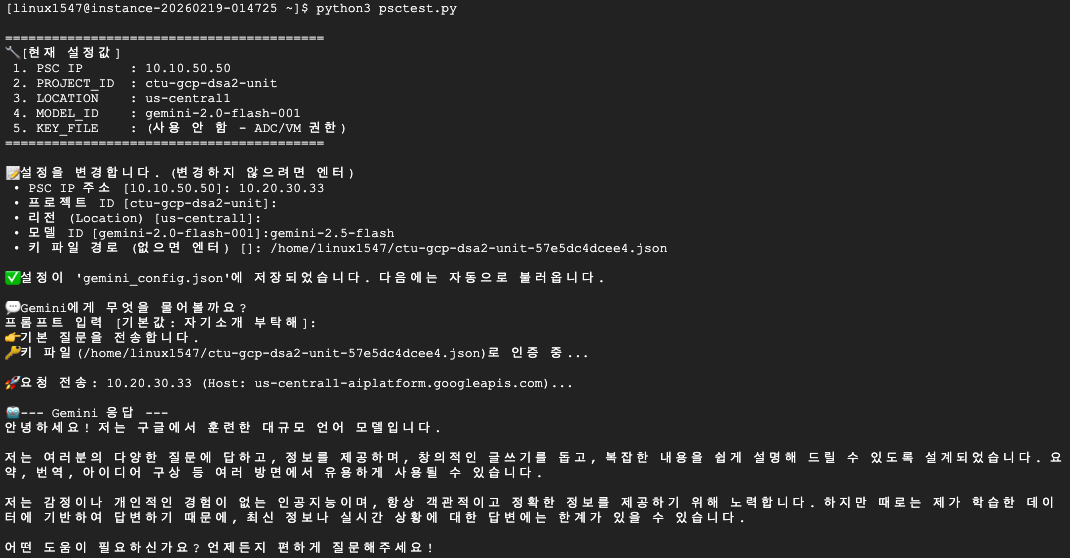
동작방식
requests, google-auth, google.auth 라이브러리 설치 여부 확인 후 없으면 설치
gemini_config.json 파일이 있으면 환경변수 값 가져옴 없으면, 아래의 설정을 입력
- PSC IP 주소 :
- 프로젝트 ID :
- 리전 (Location) : [us-central1]:
- 모델 ID :gemini-2.5-flash
- 키 파일 경로 (없으면 엔터) []: /home/linux1547/ctu-gcp-dsa2-unit-57e5dc4dcee4.json
서비스 키 (외부 서버를 위한) 먼저 인증하고, 없으면 VM의 ADC를 통해 인증
PSC를 통한 gemini model 호출진행
ADC가 로그인 환경 찾는방법
1. 환경변수
GOOGLE_APPLICATION_CREDENTIALS (JSON 키 파일 경로)가 있는가?
2. 로컬 개발자 인증
이 컴퓨터에 gcloud auth application-default login으로 로그인한 흔적이 있나?
3. VM 서비스 계정
Google Cloud VM(GCE)에 있는 서비스 계정 사용
소스코드
import sys
import subprocess
import importlib.util
import os
import json

# --- [1. 라이브러리 자동 설치] ---
def install_and_import(package_name, import_name=None):
    if import_name is None: import_name = package_name
    try:
        if importlib.util.find_spec(import_name) is None: raise ImportError
    except (ModuleNotFoundError, ImportError, AttributeError):
        print(f"📦 '{package_name}' 모듈이 없습니다. 자동으로 설치를 시도합니다...")
        try:
            subprocess.check_call([sys.executable, "-m", "pip", "install", package_name])
            print(f"✅ '{package_name}' 설치 완료!")
        except subprocess.CalledProcessError:
            sys.exit(1)

install_and_import("requests")
install_and_import("google-auth", "google.auth")

import requests
import warnings
import google.auth
import google.auth.transport.requests
from google.oauth2 import service_account
from urllib3.exceptions import InsecureRequestWarning

# --- [2. 설정 관리 로직 (핵심)] ---
CONFIG_FILE = "gemini_config.json"

# 기본값 정의 (처음 실행하거나 파일이 없을 때 사용)
DEFAULT_CONFIG = {
    "PSC_ENDPOINT_IP": "10.10.50.50",
    "PROJECT_ID": "ctu-gcp-dsa2-unit",
    "LOCATION": "us-central1",
    "MODEL_ID": "gemini-2.0-flash-001",
    "SERVICE_ACCOUNT_FILE": ""  # 비어있으면 ADC 사용
}

def load_or_ask_config():
    """설정 파일을 읽거나, 사용자에게 입력을 받아 설정을 확정합니다."""
    config = DEFAULT_CONFIG.copy()

    # 1. 저장된 설정 파일이 있는지 확인
    if os.path.exists(CONFIG_FILE):
        try:
            with open(CONFIG_FILE, "r", encoding="utf-8") as f:
                saved_config = json.load(f)
                config.update(saved_config)
            print(f"\n📂 기존 설정 파일({CONFIG_FILE})을 불러왔습니다.")
        except Exception as e:
            print(f"⚠️ 설정 파일 로드 실패 (기본값 사용): {e}")

    # 2. 현재 설정 보여주기
    print("\n=========================================")
    print(f"🔧 [현재 설정값]")
    print(f" 1. PSC IP      : {config['PSC_ENDPOINT_IP']}")
    print(f" 2. PROJECT_ID  : {config['PROJECT_ID']}")
    print(f" 3. LOCATION    : {config['LOCATION']}")
    print(f" 4. MODEL_ID    : {config['MODEL_ID']}")
    print(f" 5. KEY_FILE    : {config['SERVICE_ACCOUNT_FILE'] if config['SERVICE_ACCOUNT_FILE'] else '(사용 안 함 - ADC/VM 권한)'}")
    print("=========================================")

    # 3. 변경 여부 묻기 (엔터 치면 바로 통과)
    if os.path.exists(CONFIG_FILE):
        choice = input("\n👉 이 설정대로 진행하시겠습니까? (Y/n) [기본값: Y]: ").strip().lower()
        if choice in ["", "y", "yes"]:
            return config  # 설정 변경 없이 바로 리턴

    # 4. 설정 변경 (하나씩 입력받기)
    print("\n📝 설정을 변경합니다. (변경하지 않으려면 엔터)")

    def get_input(label, key):
        current_val = config[key]
        user_val = input(f" • {label} [{current_val}]: ").strip()
        if user_val:
            config[key] = user_val

    get_input("PSC IP 주소", "PSC_ENDPOINT_IP")
    get_input("프로젝트 ID", "PROJECT_ID")
    get_input("리전 (Location)", "LOCATION")
    get_input("모델 ID", "MODEL_ID")
    get_input("키 파일 경로 (없으면 엔터)", "SERVICE_ACCOUNT_FILE")

    # 5. 변경된 설정 저장
    try:
        with open(CONFIG_FILE, "w", encoding="utf-8") as f:
            json.dump(config, f, indent=4)
        print(f"\n✅ 설정이 '{CONFIG_FILE}'에 저장되었습니다. 다음에는 자동으로 불러옵니다.")
    except Exception as e:
        print(f"⚠️ 설정 저장 실패: {e}")

    return config

# --- [3. 인증 로직] ---
def get_access_token(config):
    scopes = ["https://www.googleapis.com/auth/cloud-platform"]
    key_file = config["SERVICE_ACCOUNT_FILE"]

    try:
        if key_file and os.path.exists(key_file):
            print(f"🔑 키 파일({key_file})로 인증 중...")
            creds = service_account.Credentials.from_service_account_file(key_file, scopes=scopes)
        else:
            print("☁️ VM 서비스 계정(또는 ADC)으로 인증 중...")
            creds, _ = google.auth.default(scopes=scopes)

        auth_req = google.auth.transport.requests.Request()
        creds.refresh(auth_req)
        return creds.token
    except Exception as e:
        print(f"❌ 인증 실패: {e}")
        return None

# --- [4. API 호출 로직] ---
def ask_gemini(config, prompt):
    token = get_access_token(config)
    if not token: return

    psc_ip = config["PSC_ENDPOINT_IP"]
    project = config["PROJECT_ID"]
    location = config["LOCATION"]
    model = config["MODEL_ID"]

    # URL 및 헤더 구성
    api_url = f"https://{psc_ip}/v1/projects/{project}/locations/{location}/publishers/google/models/{model}:generateContent"
    headers = {
        "Authorization": f"Bearer {token}",
        "Content-Type": "application/json",
        "Host": f"{location}-aiplatform.googleapis.com"
    }
    body = {"contents": [{"role": "user", "parts": [{"text": prompt}]}]}

    print(f"\n🚀 요청 전송: {psc_ip} (Host: {headers['Host']})...")
    warnings.filterwarnings('ignore', category=InsecureRequestWarning)

    try:
        response = requests.post(api_url, headers=headers, json=body, verify=False, timeout=30)
        response.raise_for_status()
        res_json = response.json()

        if "candidates" in res_json and res_json["candidates"]:
            print("\n --- Gemini 응답 ---")
            print(res_json["candidates"][0]["content"]["parts"][0]["text"])
            print("-----------------------")
        else:
            print("\n⚠️ 응답 텍스트 없음:", res_json)

    except Exception as e:
        print(f"\n❌ 오류 발생: {e}")
        if 'response' in locals():
            try: print("상세:", json.dumps(response.json(), indent=2))
            except: pass
    finally:
        warnings.resetwarnings()

# --- [메인 실행] ---
if __name__ == "__main__":
    # 1. 설정 불러오기 (또는 물어보기)
    final_config = load_or_ask_config()

    # 2. 프롬프트 입력받기 (기본값: 자기소개)
    print("\n💬 Gemini에게 무엇을 물어볼까요?")
    user_prompt = input("프롬프트 입력 [기본값: 자기소개 부탁해]: ").strip()

    if not user_prompt:
        user_prompt = "자기소개 부탁해"
        print("기본 질문을 전송합니다.")

    # 3. 실행
    ask_gemini(final_config, user_prompt)
참고
-
SSL 에러방지: verify=False 설정을 통해 PSC IP 접속 시 발생하는 인증서 오류를 무시함.
-
Host 헤더: PSC 호출 시 엔드포인트 도메인(aiplatform.googleapis.com)을 Host 헤더에 반드시 명시해야 함
'Cloud > GCP' 카테고리의 다른 글
| GCP 프로젝트 삭제 방안 (0) | 2026.02.27 |
|---|---|
| GCP Workload Identity Federation (WIF - 워크로드아이덴티티) 설정 (0) | 2026.02.26 |
| Keycloak 설치 및 구성 매뉴얼 (GCP WIF 테스트) (0) | 2026.02.25 |
| AI SRE Auto-Remediator - Google Gemini AI 기반 실시간 시스템 장애 탐지 및 자동 복구 에이전트 - PT본 (0) | 2026.01.11 |
| AI SRE Auto-Remediator - Google Gemini AI 기반 실시간 시스템 장애 탐지 및 자동 복구 에이전트 (0) | 2026.01.08 |
| Gemini Code Assist VPN to PGA(비공개연결) 구성방안 (0) | 2025.10.28 |
| gcloud + shell script로 Windows VM 빠르게 생성하기 (0) | 2025.10.23 |