목표
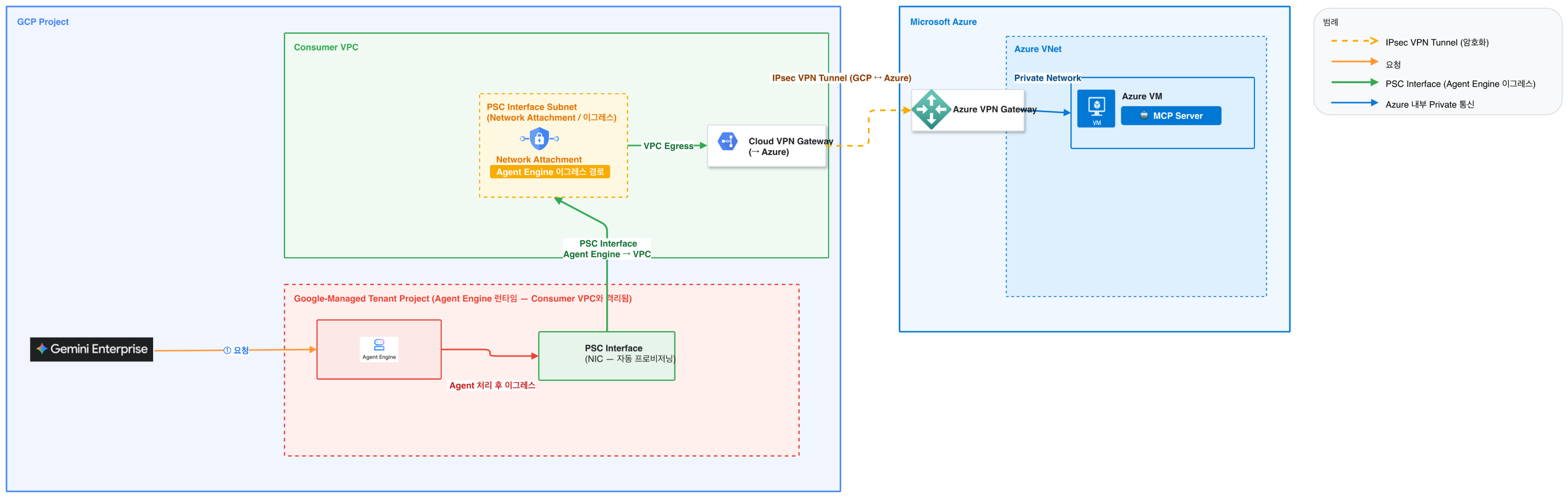
GCP Agent Engine에서 PSC-Interface -> 외부 MCP Server를 사용하는 방안을 정리
3가지로 구분되어 진행됩니다.
- Agent Engine 실행(배포)하는 단말기의 설정
- GCP 설정
PSC network-attachment 설정
Agent Engine 설정
VPN 설정
- MCP Server와 통신하여 처리
VPN을 제외하고는 대부분 Python코드로 진행되어야함
- FAQ
- Gemini Enterprise -> Agent Engine간 통신
https://docs.cloud.google.com/architecture/multi-agent-private-networking-patterns?hl=ko
- Gemini Enterprise 앱은 VPC 네트워크 외부이지만 Google 네트워크 내의 호스팅 환경에서 작동하는 관리 리소스입니다.
- Vertex AI Agent Engine의 커스텀 에이전트:
Vertex AI Agent Engine에서 전송된 트래픽은 연결의 서브넷 IP 주소에서 시작된 것처럼 VPC 네트워크에 표시됩니다. 그러면 VPC 네트워크에서 트래픽을 적절한 대상 IP 주소로 라우팅합니다.
- Agent Engine 서브넷 관련 [Docs](https://docs.cloud.google.com/agent-builder/agent-engine/private-service-connect-interface)
- PSC-Interface 생성방안 [](https://docs.cloud.google.com/agent-builder/agent-engine/deploy)[Docs](https://docs.cloud.google.com/agent-builder/agent-engine/deploy)
- Agent Engine을 배포할 단말기 설정
- GCP Login
gcloud auth application-default login
GCE사용시에는 모든 API or Vertex AI API 설정 - Python 가상환경 설정
python3 -m venv .venv
source .venv/bin/activate
- Vertex AI SDK 설치
pip install google-cloud-aiplatform
pip install python-dotenv
pip install "google-cloud-aiplatform[agent_engines]"
- GCP Login
- 네트워크 작업
- PSC-interface용 서브넷 생성
gcloud compute networks subnets create my-ae-psc-subnet --range=192.168.10.0/28 --network=psc-i-vpc --region=asia-northeast3 - Network Attachment 생성
gcloud compute network-attachments create my-ae-psc-attachment \
--region=asia-northeast3 \
--connection-preference=ACCEPT_AUTOMATIC \
--subnets=my-ae-psc-subnet - IAM 권한 필요 (Network Attachment 생성)

Vertex AI Service Agent인 gcp-sa-aiplatform.iam.gserviceaccount.com 에 roles/compute.networkadmin 추가필요
- PSC-interface용 서브넷 생성
- MCP-Server 작업
- Python 가상환경 설정
python3 -m venv .venv
source .venv/bin/activate - 라이브러리 설치
pip install "fastapi[standard]" - MCP Server 실행python onprem_mcp_server.py
- Python 가상환경 설정
파일
.env                    # 환경변수 설정
onprem_mcp_server.py    # [온프레미스 실행] MCP 서버
deploy_mcp_agent.py     # [Cloud Shell 실행] 배포 스크립트
.env (환경변수 설정)
실제 본인의 프로젝트 ID와 Network Attachment 경로, 온프레미스 사설 IP로 수정
GOOGLE_CLOUD_PROJECT=ctu-gcp-dsa2-unit
GOOGLE_CLOUD_LOCATION=asia-northeast3
GOOGLE_CLOUD_STAGING_BUCKET=gs://ctu-gcp-dsa2-unit-agent-staging
ONPREMISE_MCP_HOST=http://10.10.10.100
ONPREMIS
# [선택] PSC-i 연결 시 미리 만들어둔 네트워크 연결(Network Attachment) 이름을 기입하세요 (예: my-network-attachment)
NETWORK_ATTACHMENT_NAME=my-ae-psc-attachment
onprem_mcp_server.py (온프레미스 실행용)
온프레미스 서버에서 실행하여 에이전트의 요청을 기다립니다.
기본적으로 8000 포트로 실행하였고, 방화벽에서 Agent Engine의 IP를 허용해야 합니다.
from fastapi import FastAPI
import psutil
import platform

app = FastAPI(title="On-premise MCP Server")

@app.get("/api/v1/system_status")
def get_system_status():
    """
    현재 On-premise 서버의 CPU, 메모리, 데몬(프로세스 수 등) 현황을 리턴합니다.
    """
    cpu_usage = psutil.cpu_percent(interval=1)
    memory = psutil.virtual_memory()
    disk = psutil.disk_usage('/')

    # 간단히 데몬/프로세스 수 확인 및 주요 프로세스 이름 추출
    process_count = len(psutil.pids())
    daemons = []
    for proc in psutil.process_iter(['name', 'username']):
        try:
            if proc.info['username'] == 'root' or proc.info['username'] == 'systemd':
                daemons.append(proc.info['name'])
        except (psutil.NoSuchProcess, psutil.AccessDenied):
            pass
    active_daemons = list(set(daemons))[:10] # 대표적인 데몬 10개만 리스트업

    return {
        "status": "success",
        "data": {
            "hostname": platform.node(),
            "os": platform.system(),
            "cpu_usage_percent": cpu_usage,
            "memory_total_gb": round(memory.total / (1024**3), 2),
            "memory_used_gb": round(memory.used / (1024**3), 2),
            "memory_usage_percent": memory.percent,
            "disk_usage_percent": disk.percent,
            "running_daemons_count": process_count,
            "sample_daemons": active_daemons,
            "message": "On-premise 서버 리소스가 정상적으로 수집되었습니다."
        }
    }

if __name__ == "__main__":
    import uvicorn
    # 기본 포트 8000번에서 실행
    uvicorn.run(app, host="0.0.0.0", port=8000)
deploy_mcp_agent.py (배포와 실행 파일)
import os
import vertexai
from vertexai.agent_engines import AgentEngine
from google.cloud import aiplatform
from dotenv import load_dotenv

load_dotenv()

# --- [에이전트 정의] ---
class McpOnPremiseAgent:
    def __init__(self, project_id: str, location: str, host: str, port: str):
        self.project_id = project_id
        self.location = location
        self.host = host
        self.port = port

    def set_up(self):
        import vertexai
        vertexai.init(project=self.project_id, location=self.location)

    def query(self, input: str = None, message: str = None) -> str:
        """호환성을 위해 input과 message 인자를 모두 수용합니다."""
        import socket
        import requests
        from vertexai.generative_models import GenerativeModel

        user_query = input or message
        if not user_query:
            return "질문이 입력되지 않았습니다."

        model = GenerativeModel("gemini-2.5-flash")

        conn_status = "Unknown"
        telemetry_data = "데이터 없음"

        if any(kw in user_query.lower() for kw in ["체크", "상황", "현황", "상태", "mcp"]):
            sock = None
            try:
                # 호스트에서 프로토콜 제거 및 IP 추출
                clean_host = self.host.replace("http://", "").replace("https://", "").split("/")[0].split(":")[0]
                sock = socket.socket(socket.AF_INET, socket.SOCK_STREAM)
                sock.settimeout(10.0)

                if sock.connect_ex((clean_host, int(self.port))) == 0:
                    conn_status = "Online"
                    try:
                        resp = requests.get(f"http://{clean_host}:{self.port}/api/v1/system_status", timeout=10.0)
                        if resp.status_code == 200:
                            telemetry_data = resp.text
                        else:
                            telemetry_data = f"[API Error {resp.status_code}]"
                    except Exception as api_e:
                        telemetry_data = f"[API Connect Fail] {api_e}"
                else:
                    conn_status = "Offline"
            except Exception as e:
                conn_status = f"Connectivity Error: {e}"
            finally:
                if sock: sock.close()

        prompt = f"사용자 질문: {user_query}\n\n[결과]\n상태: {conn_status}\n데이터: {telemetry_data}\n\n이 정보를 바탕으로 상세 보고서를 한국어로 작성하세요. 만약 Offline 상태라면 PSC-i 네트워크 연결을 점검하라고 안내하세요."
        response = model.generate_content(prompt)
        return response.text

# --- [배포 및 테스트 로직] ---
PROJECT_ID = os.environ.get("GOOGLE_CLOUD_PROJECT")
LOCATION = os.environ.get("GOOGLE_CLOUD_LOCATION", "asia-northeast3")
STAGING_BUCKET = os.environ.get("GOOGLE_CLOUD_STAGING_BUCKET")
ATTACHMENT = os.environ.get("NETWORK_ATTACHMENT_NAME")

def deploy():
    if not ATTACHMENT:
        print("[오류] NETWORK_ATTACHMENT_NAME이 설정되지 않았습니다.")
        return

    vertexai.init(project=PROJECT_ID, location=LOCATION, staging_bucket=STAGING_BUCKET)

    target_host = os.environ.get("ONPREMISE_MCP_HOST", "127.0.0.1")
    target_port = os.environ.get("ONPREMISE_MCP_PORT", "8000")
    clean_host = target_host.replace("http://", "").replace("https://", "").split("/")[0]

    agent = McpOnPremiseAgent(PROJECT_ID, LOCATION, clean_host, target_port)
    attachment_path = f"projects/{PROJECT_ID}/regions/{LOCATION}/networkAttachments/{ATTACHMENT}"
    psc_config = {"network_attachment": attachment_path}

    print(f"--- 에이전트 배포 시작 ---")
    print(f"PSC Attachment: {attachment_path}")

    # 안정적인 AgentEngine.create 사용
    remote_app = AgentEngine.create(
        agent_engine=agent,
        requirements=["google-cloud-aiplatform[agent_engines]", "requests"],
        display_name="mcp-agent-psc-final",
        psc_interface_config=psc_config
    )

    print(f"\n[성공] 에이전트 배포 완료: {remote_app.resource_name}")

def query_remote(resource_name: str, text: str):
    vertexai.init(project=PROJECT_ID, location=LOCATION)
    remote = AgentEngine(resource_name)
    print(f"[{LOCATION}] 질의 중: {text}")
    print(f"\n[Response]\n{remote.query(input=text)}")

if __name__ == "__main__":
    import sys
    if len(sys.argv) > 1 and sys.argv[1] == "deploy":
        deploy()
    elif len(sys.argv) > 3 and sys.argv[1] == "query":
        query_remote(sys.argv[2], sys.argv[3])
    else:
        print("Usage: python deploy_mcp.py [deploy|query <resource_name> <text>]")
다른 PC에서 Agent Engine 실행시
python3 deploy.py query Agent URL(projects/361709030411/locations/asia-northeast3/reasoningEngines/8342038700401623040) "온프레미스 서버 상태 체크해줘"
import vertexai
from vertexai.preview import reasoning_engines

# 1. 초기화 (프로젝트와 리전 설정)
vertexai.init(project="ctu-gcp-dsa2-unit", location="asia-northeast3")

# 2. 배포된 Agent Engine ID (콘솔이나 배포 로그에서 확인된 ID)
AGENT_ID = "https://asia-northeast3-aiplatform.googleapis.com/v1/projects/ctu-gcp-dsa2-unit/locations/asia-northeast3/reasoningEngines/2870868840588247040:query"

# 3. 에이전트 불러오기
agent_engine = reasoning_engines.ReasoningEngine(AGENT_ID)

# 4. 테스트 쿼리
print("--- 에이전트로부터 응답을 기다리는 중 ---")
response = agent_engine.query(input="온프레미스 서버 상태 어때?")
print(f"응답: {response}")
- 질의 후 성공시
PC(단말) -> GCP Agent Engine -> VPN -> On-premise or Cloud 에 존재하는 MCP서버(SSE) 에서 응답 받아 Agent Engine에서 응답을 주게 됩니다.

'Cloud > GCP' 카테고리의 다른 글
| GCP Agent Runtime (Agent Engine) - PSC to PSC-Interface을 통한 연결 방안 (0) | 2026.05.12 |
|---|---|
| GCP PSC(Priave Service Connect) 에서 VPC-SC 사용하여 Gemini API 보호 (0) | 2026.05.11 |
| GCP VPC-SC(VPC Service Controls) 정리 (0) | 2026.05.08 |
| GCP VPC간 Classic VPN 생성 스크립트 (0) | 2026.04.22 |
| GCP 메일 계정과 도메인 (0) | 2026.04.20 |
| Model Armor 실시간 알림 설정 방안 (0) | 2026.04.01 |
| GCP OAuth(인증)을 PSC (Private Service Connect)를 통해 사설망으로 연결하는 방안 (0) | 2026.03.31 |